Windows Memory & Network
Task 1 Introduction
This room continues the memory investigation from the previous analysis. This is the last room out of 3, and we will be focusing on how network activity and post-exploitation behavior are captured in RAM. We’ll examine artifacts from a live attack involving advance payloads like Meterpreter, suspicious child processes, and unusual outbound connections. All analyses will be performed using Volatility 3 and hands-on techniques applied directly to the memory dump.
We’ll walk through real indicators tied to remote shells, persistence via startup folder abuse, and malware attempting outbound communications. Users will use memory structures, plugin outputs, and process inspection to track network behavior step by step.
Learning Objectives
- Identify network connections in a memory dump.
- Identify suspicious ports and remote endpoints.
- Link connections to processes.
- Detect reverse shells and memory injections in a memory dump.
- Trace PowerShell and C2 activity in memory.
Prerequisites
Click to continue to the room.
No answer needed
Task 2 Scenario Information
Scenario
You are part of the incident response team handling an incident at TryHatMe - a company that exclusively sells hats online. You are tasked with analyzing a full memory dump of a potentially compromised Windows host. Before you, another analyst had already taken a full memory dump and gathered all the necessary information from the TryHatMe IT support team. You are a bit nervous since this is your first case, but don't worry; a senior analyst will guide you.
Information Incident THM-0001
- On May 5th, 2025, at 07:30 CET, TryHatMe initiated its incident response plan and escalated the incident to us. After an initial triage, our team found a Windows host that was potentially compromised. The details of the host are as follows:
- Hostname: WIN-001
- OS: Windows 1022H 10.0.19045
- At 07:45 CET, our analyst Steve Stevenson took a full memory dump of the Windows host and made a hash to ensure its integrity. The memory dump details are:
- Name:
THM-WIN-001_071528_07052025.dmp - MD5-hash:
78535fc49ab54fed57919255709ae650
- Name:
Company Information TryHatMe
Network Map
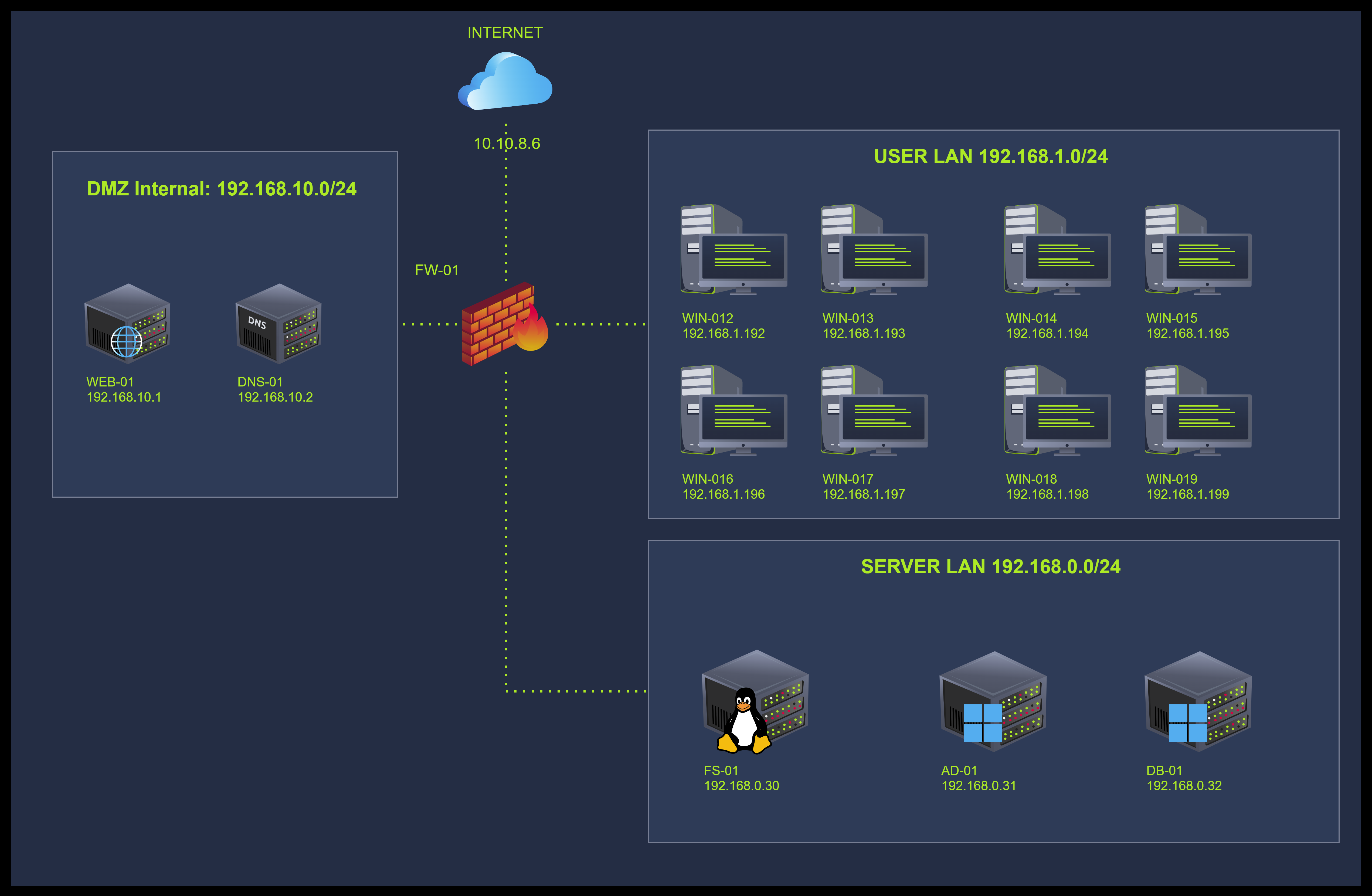
I went through the case details and am ready to find out more.
No answer needed
Task 3 Environment & Setup
Before moving forward, start the VM by clicking the Start Machine button on the right.
It will take around 2 minutes to load properly. The VM will be accessible on the right side of the split screen. If the VM is not visible, use the blue Show Split View button at the top of the page.
The details for the assignment are:
- File Name: THM-WIN-001_071528_07052025.mem
- File MD5 Hash: 78535fc49ab54fed57919255709ae650
- File Location:
/home/ubuntu
To run volatility, you can use the vol command in the VM. For example: vol -h will display the help menu for volatility.
Click here if you were able to start your environment.
No answer needed
Task 4 Analyzing Active Connections
In the previous room, we focused on identifying user activity within memory. Now, we shift our attention to network connections established by the suspected malicious actor. We'll begin by searching for artifacts in memory that reveal what connections were made and what kind of network activity took place during the intrusion.
Scanning Memory for Network Evidence
Let's start by scanning the memory dump with the Windows.netscan plugin. This plugin inspects kernel memory pools for evidence of TCP and UDP socket objects, regardless of whether the connections are still active. It's beneficial in cases where the process we are investigating may have terminated or cleaned up connections.
To inspect the network connections, volatility locates the EPROCESS structure to extract PIDs and map these to active TCP ENDPOINT or UDP ENDPOINT objects (undocumented) found in memory. This approach works even if a connection has already been closed, making it more useful than netstat on a live system.
When analysing connections to look for supicious traffic, we should be aware of the following:
- Unusual port activity or outbound connections to unfamiliar addresses
- Communication with external IPs on non-standard ports
- Local processes holding multiple sockets
- PIDs tied to previously identified suspicious binaries
Let's look for the patterns mentioned above. We'll start by running the following command vol -f THM-WIN-001_071528_07052025.mem windows.netscan > netscan.txt, which will save the output in the netscan.txt file as shown below. We can then inspect it using the cat command or any text visualizer.
Note: This command can take some time to finish, depending on CPU usage and the size of the memory dump. In case you do not want to wait, you can access the same output in the already existing file netscan-saved.txt. There are also some other commands that have been pre-saved to save time if needed.
user@tryhackme~$ vol -f THM-WIN-001_071528_07052025.mem windows.netscan >  netscan.txt
user@tryhackme$cat netscan.txt

Offset    Proto    LocalAddr    LocalPort    ForeignAddr    ForeignPort    State    PID    Owner    Created
[REDACTED]
0x990b28ae34c0    UDPv4    169.254.106.169    138    *    0        4    System    2025-05-07 07:08:58.000000 UTC
0x990b28bf3230    TCPv4    169.254.106.169    139    0.0.0.0    0    LISTENING    4    System    2025-05-07 07:08:58.000000 UTC
0x990b28bf3650    TCPv4    0.0.0.0    4443    0.0.0.0    0    LISTENING    10084    windows-update    2025-05-07 07:13:05.000000 UTC
[REDACTED]
0x990b299a81f0    UDPv4    127.0.0.1    1900    *    0        9496    svchost.exe    2025-05-07 07:09:11.000000 UTC
0x990b29ab8010    TCPv4    192.168.1.192    [REDACTED]    192.168.0.30    22    ESTABLISHED    6984    powershell.exe    2025-05-07 07:15:15.000000 UTC
0x990b29ade8a0    TCPv4    192.168.1.192    4443    10.0.0.129    47982    ESTABLISHED    10084    windows-update    2025-05-07 07:13:35.000000 UTC
0x990b2a32ca20    TCPv4    192.168.1.192    [REDACTED]    10.0.0.129    8081    ESTABLISHED    10032    updater.exe    [REDACTED] UTC
0x990b2a630a20    TCPv6    ::1    55986    ::1    445    CLOSED    4    System    2025-05-07 07:14:06.000000 UTC
0x990b2a824770    UDPv6    fe80::185b:1837:f9f7:bffd    49595    *    0        9496    svchost.exe    2025-05-07 07:09:11.000000 UTC
0x990b2a824900    UDPv6    fe80::185b:1837:f9f7:bffd    1900    *    0        9496    svchost.exe    2025-05-07 07:09:11.000000 UTC
0x990b2a824db0    UDPv6    ::1    1900    *    0        9496    svchost.exe    2025-05-07 07:09:11.000000 UTC
[REDACTED]
We can observe in the output above that some connections are marked as ESTABLISHED. We can notice that PID 10032 (updater.exe) is connected to IP 10.0.0.129 on port 8081. That is an external network and suggests it may be the attacker's infrastructure. Another connection of interest is from PID 6984 (powershell.exe) reaching out to 192.168.0.30:22, suggesting lateral movement. Also, as we know from previous analysis, the binary windows-update.exe is also part of the chain of execution we are investigating and was placed for persistence purposes in the C:\Users\operator\AppData\Roaming\Microsoft\Windows\StartMenu\Programs\Startup\ directory. It is listening on port 4443, which makes sense to be set up like that since it seems to be the one listening for instructions. Let’s now move on to confirm this and spot which active listening ports are.
user@tryhackme~$ cat netscan.txt |grep LISTENING
0x990b236b3310    TCPv4    0.0.0.0    445    0.0.0.0    0    LISTENING    4    System    2025-05-07 07:08:50.000000 UTC
[REDACTED]
0x990b27ffee90    TCPv4    0.0.0.0    3389    0.0.0.0    0    LISTENING    364    svchost.exe    2025-05-07 07:08:49.000000 UTC
0x990b27ffee90    TCPv6    ::    3389    ::    0    LISTENING    364    svchost.exe    2025-05-07 07:08:49.000000 UTC
0x990b28bf3230    TCPv4    169.254.106.169    139    0.0.0.0    0    LISTENING    4    System    2025-05-07 07:08:58.000000 UTC
0x990b28bf3650    TCPv4    0.0.0.0    4443    0.0.0.0    0    LISTENING    10084    windows-update    2025-05-07 07:13:05.000000 UTC
0x990b28de7e10    TCPv4    0.0.0.0    49671    0.0.0.0    0    LISTENING    3020    svchost.exe    2025-05-07 07:08:51.000000 UTC
0x990b28de80d0    TCPv4    0.0.0.0    49671    0.0.0.0    0    LISTENING    3020    svchost.exe    2025-05-07 07:08:51.000000 UTC
0x990b28de80d0    TCPv6    ::    49671    ::    0    LISTENING    3020    svchost.exe    2025-05-07 07:08:51.000000 UTC
0x990b28de8390    TCPv4    0.0.0.0    5040    0.0.0.0    0    LISTENING    6124    svchost.exe    2025-05-07 07:08:59.000000 UTC
0x990b28de8910    TCPv4    192.168.1.192    139    0.0.0.0    0    LISTENING    4    System    2025-05-07 07:08:51.000000 UTC
We can observe several system processes like svchost.exe and lsass.exe listening on common Windows ports. However, we can also confirm that the only non-standard process listening is windows-update.exe (PID 10084), which is listening on port 4443.
This seems to be highly irregular. We already know that the process had established a connection with the potential attacker and is accepting inbound connections. This could be for file staging, secondary payloads, or as we already confirmed, for persistence.
Note: As a sanity check, try also running windows.netstat. This plugin relies on live system structures instead of scanning memory, so it may return fewer results, but it is useful to compare what's still active and also to check the connection's order by timestamp.
Great, at this point, we’ve confirmed:
- updater.exe (PID 10032) was in an active session with a known attacker IP using port 8081.
- windows-update.exe (PID 10084) had its own established session and was listening on port 4443.
- powershell.exe (PID 6984) connected to 192.168.0.30:22, likely the next internal target.
These findings help confirm suspicions of remote control via C2, plus lateral movement activity. In the next section, we'll explore more into this in order to confirm our findings.
What is the remote source port number used in the connection between 192.168.1.192 and 10.0.0.129:8081?
Which internal IP address received a connection on port 22 from the compromised host?
What is the exact timestamp when the connection from the IP addresses in question 1 was established?
What is the local port used by the system to initiate the SSH connection to 192.168.0.30?
What is the protocol used in the connection from 192.168.1.192:55985 to 10.0.0.129:8081?
What is the order in which the potential malicious processes established outbound connections?